HEPH-3D
Text to machineMachines, not models. Describe one in a sentence and get printable, validated files, a costed parts list, and something that works when you assemble it.
WINDOWS - MAC - LINUX
Requires Claude Code — runs on the Claude plan you already have.
If you can describe it, you can build it.
HEPH-3D is a machine-design studio driven by plain language. Say what you want — how it moves, what it does, roughly how big — and it does the CAD, picks real parts you can actually buy, routes the wiring, and hands you files that print and a bill that adds up. No CAD training required. Nothing dumbed down to manage it.
Creators & makers
Your first print doesn’t have to be a benchy. Go from an idea to a working, moving thing without ever learning where the fillet button is.
Inventors
Prototype the idea the evening you have it. Iterate by saying what’s wrong — the model rebuilds, the costs update, the files re-export.
Professionals
A real CAD kernel underneath, every clearance and connector inspectable, and the design itself is plain Python in your own files. Easy to start never means locked in.
Not a part. A machine, in parts.
Several bodies at once
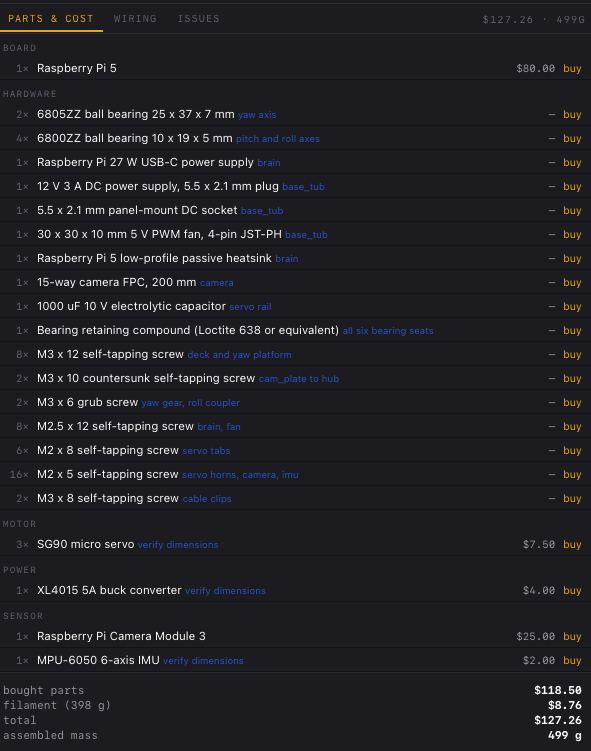
Real mechanisms, real electronics at their true hole patterns, wiring, and clearances tuned to your printer and material.
Swept, not just static
Every joint is swept for collisions across its full range of travel before a single file is written to disk.
Plain Python, yours to keep
A design is a module exposing build() → Assembly. Saved to your Documents, never inside the app.
Claude Code, anchored inside the model
Not a chat widget talking to an API — a real Claude session running in your project directory. Click a part, ask about it, and the context goes in for you. Edit the design and the model rebuilds and reloads on its own.
Nothing exports until it passes
A full validation pass runs before a single file is written — motion, printability, fit and power all checked together. Anything that would only reveal itself on the bed or on the bench fails here instead, with a plain-language reason.
A tight fit your printer can't repeat is a coin toss
Printed parts don't come out at the size you drew them, and no two printers miss by the same amount. Ask for a fit finer than your machine can repeat and some parts will fall together while others split — so that gets caught here, not on the bed.
Every clearance in a design flows through one printer-and-material profile, so it always knows what your setup can actually deliver.
Print a single coupon, take six measurements, and the profile learns what your machine really does — how holes come out, how the material shrinks, how thin a wall it will hold.
Retarget a whole design to another printer or material with one line.
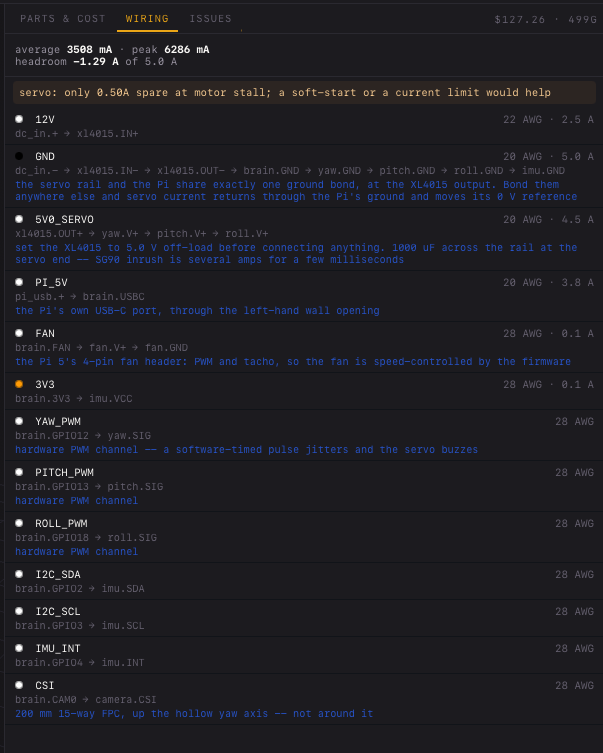
A netlist will happily pass a robot that browns out
Stall, not running peak
A motor draws far more when it can't turn — which happens on every start-up. Size on running peak and the design passes while the robot doesn't.
Voltage drop with geometry
Worked out once the harness has a real physical path, so a long thin run can't quietly arrive brown-out low.
Connector ratings
The wire is rarely the weak point. Every connector is checked against the current actually passing through it.
Fuse sizing
Sized off the worst case, so it survives inrush instead of blowing at switch-on and teaching you to fit a bigger one.
Every component in the catalogue carries its real dimensions, hole pattern, keepout and current draw. Mount one and the standoffs generate at its true pitch — and the design always tells you which numbers have been verified and which haven't.
Under the hood
For the crowd that reads the spec sheet before the brochure. This is the part hobbyists never have to open — and professionals will want to.
Get early access
Join the list for the next build, or enter a tester code if you already have one.
One thing to have ready: Claude Code, installed and signed in. HEPH-3D runs your own Claude, on your own plan.
Tester agreement
HEPH-3D is a desktop app — open this page on a Mac, PC or Linux machine to download it. Your code will still work.
Your platform is listed first. These links are personal and expire after a few minutes — redeem again for fresh ones.
Before you install
macOS 11+, Apple Silicon and Intel. Python and the CAD kernel ship inside the app — nothing to install and nothing to set up.
The app is signed but not notarised yet, so macOS will claim it “could not verify HEPH-3D is free of malware” and offer only Move to Trash. Nothing is wrong with the build. Drag it to Applications, then run this once:
xattr -dr com.apple.quarantine /Applications/HEPH-3D.app
On macOS 15 and later, right-click → Open no longer works — Apple removed it.
Windows 10 and 11, 64-bit. Python and the CAD kernel ship inside the installer — nothing else to install.
The installer is not code-signed yet, so SmartScreen will show “Windows protected your PC”. Click More info, then Run anyway. That warning is about the missing signature, not about the build.
Linux, x86-64. Ships as a tarball with its own Python and CAD kernel. Unpack it anywhere and run it:
tar xzf HEPH-3D-linux-x86_64.tar.gz
./HEPH-3D-linux-x86_64/heph
The window needs your system’s WebKit runtime. On Debian or Ubuntu: sudo apt install libwebkit2gtk-4.1-0
Every platform needs Claude Code installed and signed in; HEPH-3D runs your own copy under your own account.